




Ricoh ScanSnap IX1300


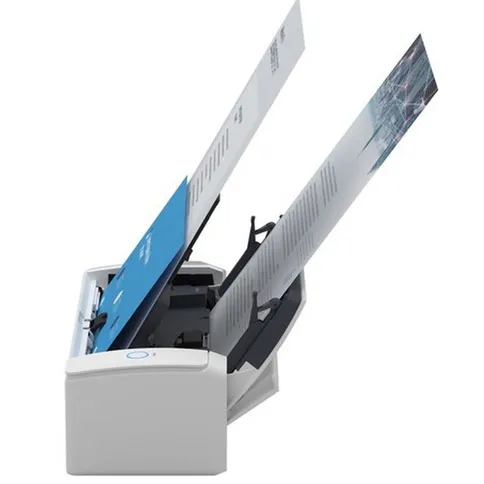


Take document scanning to the next level with the Ricoh ScanSnap IX1300. Whether you digitize recipes, bank statements or theses at home or capture crucial documents for a business trip in the office: with ScanSnap, scanning goes beyond the desktop.
€ 399. 00
This product is purchased exclusively for you.
Take document scanning to the next level with the Ricoh ScanSnap IX1300. Whether you digitize recipes, bank statements or theses at home or capture crucial documents for a business trip in the office: with ScanSnap, scanning goes beyond the desktop.
Promotions and services
Reviews
Description
Ricoh ScanSnap IX1300
Take document scanning to the next level with the Ricoh ScanSnap IX1300. Whether you're digitizing recipes, bank statements or theses at home or capturing mission-critical documents for a business trip at the office, ScanSnap goes beyond the desktop. After scanning, a ScanSnap shortcut menu for PC and Mac will automatically open in a pop-up window. Here you will find plenty of options to start using your scans productively right away. This menu can be easily customized to show only your favourites, give a recommendation and even show custom profiles.
CardMinder business card scanning software
ScanSnap S1300i can quickly scan a business card and transfer the data into editable fields that can be exported to Entourage and Address Book.
ScanSnap Organizer
View, manage and edit PDF and JPEG files scanned with ScanSnap on a Windows platform. With Organizer, you can convert scanned PDF files into searchable content, add specific keywords to them, and attach the files to emails or put them in SharePoint. This way you can work productively with paper documents, even long after they have been scanned.
Features of the Ricoh ScanSnap IX1300
- Smallest ScanSnap for multi-page duplex scanning on the go or in the office
- Intelligent scan correction: ScanSnap turns disorder into order with intelligent features that correct images for you behind the scenes
- Works with both Mac and PC operating systems for ultimate flexibility and portability
- Scan up to 12 double-sided pages per minute
- ADF for up to 10 sheets
- Compatible with PC and Mac platforms
- Create searchable PDFs with one button, PDF and JPEG
- Scan to editable Word and Excel files
- Create searchable keywords from highlighted text
- Business card scanning software
- Power supply via USB or AC
- Dimensions (W x D x H): 284 x 99 x 77 mm
- Weight: 1.4 kg
In the Box
- Ricoh ScanSnap IX1300
- AC cable
- AC adapter
- USB bus power cord
- USB cable
- Getting started
- Installation DVD-ROM
Information on the EU General Product Safety Regulation (GPSR)
Ricoh
Ricoh Imaging Europe S.A.S.
avenue Robert Schuman 7-9 94150 Rungis FR
Ricoh ScanSnap IX1300
Take document scanning to the next level with the Ricoh ScanSnap IX1300. Whether you're digitizing recipes, bank statements or theses at home or capturing mission-critical documents for a business trip at the office, ScanSnap goes beyond the desktop. After scanning, a ScanSnap shortcut menu for PC and Mac will automatically open in a pop-up window. Here you will find plenty of options to start using your scans productively right away. This menu can be easily customized to show only your favourites, give a recommendation and even show custom profiles.
CardMinder business card scanning software
ScanSnap S1300i can quickly scan a business card and transfer the data into editable fields that can be exported to Entourage and Address Book.
ScanSnap Organizer
View, manage and edit PDF and JPEG files scanned with ScanSnap on a Windows platform. With Organizer, you can convert scanned PDF files into searchable content, add specific keywords to them, and attach the files to emails or put them in SharePoint. This way you can work productively with paper documents, even long after they have been scanned.
Features of the Ricoh ScanSnap IX1300
- Smallest ScanSnap for multi-page duplex scanning on the go or in the office
- Intelligent scan correction: ScanSnap turns disorder into order with intelligent features that correct images for you behind the scenes
- Works with both Mac and PC operating systems for ultimate flexibility and portability
- Scan up to 12 double-sided pages per minute
- ADF for up to 10 sheets
- Compatible with PC and Mac platforms
- Create searchable PDFs with one button, PDF and JPEG
- Scan to editable Word and Excel files
- Create searchable keywords from highlighted text
- Business card scanning software
- Power supply via USB or AC
- Dimensions (W x D x H): 284 x 99 x 77 mm
- Weight: 1.4 kg
In the Box
- Ricoh ScanSnap IX1300
- AC cable
- AC adapter
- USB bus power cord
- USB cable
- Getting started
- Installation DVD-ROM
Information on the EU General Product Safety Regulation (GPSR)
Ricoh
Ricoh Imaging Europe S.A.S.
avenue Robert Schuman 7-9 94150 Rungis FR
Specifications
| Connections | |
|---|---|
| Memory card slot |
| Connectivity | |
|---|---|
| Wi-Fi | |
| USB connection | USB-B (USB 3.x) |
| General | |
|---|---|
| Article number | 12393012 |
| Product colour | Grey |
| Type of scanner | Document scanner |
| Physical features | |
|---|---|
| Width (cm) | 28.4 |
| Height (cm) | 7.7 |
| Depth (cm) | 11.4 |
| Sensor | |
|---|---|
| Type of sensor | Dual CIS |
| Technical features | |
|---|---|
| Scan resolution (dpi) | 600 |
| Input colour depth | 24 |
| Output colour depth | 1 |
| Maximum scannable format | A4 |
| Suitable for photo/film/slide scanning |
| Connections | |
|---|---|
| Memory card slot |
| General | |
|---|---|
| Article number | 12393012 |
| Product colour | Grey |
| Type of scanner | Document scanner |
| Sensor | |
|---|---|
| Type of sensor | Dual CIS |
| Technical features | |
|---|---|
| Scan resolution (dpi) | 600 |
| Input colour depth | 24 |
| Output colour depth | 1 |
| Maximum scannable format | A4 |
| Suitable for photo/film/slide scanning |
| Connectivity | |
|---|---|
| Wi-Fi | |
| USB connection | USB-B (USB 3.x) |
| Physical features | |
|---|---|
| Width (cm) | 28.4 |
| Height (cm) | 7.7 |
| Depth (cm) | 11.4 |