• Photo cameras
  • Lenses
  • Tripod
  • Video Cameras
  • Bags
  • Studio
  • Image editing
  • Binoculars
  • Accessories
  • Promotions
  • Canon
  • Sony
  • Nikon
  • Panasonic
  • Fujifilm
  • Sigma
  • DJI
  • Tamron
  • OM SYSTEM
  • Epson
  • All brands
  • Popular Sony Cameras
  • sony-a7v-1.jpg

    Sony A7 V

  • sony-a6700-body_1.jpg

    Sony A6700 body

  • 12311310_1.jpg

    Sony Cybershot DSC-RX100 mark VII

  • Popular Sony Lenses
  • SONY-FE-24-70MM-F2.8-GM-II-1.jpg

    Sony FE 24-70mm F/2.8 GM II

  • SONY-FE-24-105MM-F4.0G-OSS-1.jpg

    Sony FE 24-105mm F4 G OSS E-Mount

  • SONY-FE-50MM-F1.8-1.jpg

    Sony 50mm F1.8 E-Mount Full Frame

  • Popular Nikon Cameras
  • Nikon-Z8_1.jpg

    Nikon Z8 body

  • nikon-z6-iii-1.jpg

    Nikon Z6 III

  • nikon-zf_1.jpg

    Nikon ZF

  • Popular Nikon Lenses
  • Nikon Z 24-70mm F28 S-line Nikkor 1.jpg

    Nikkor Z 24-70mm F2.8 S

  • Nikon-Z-70-200mm-F18-S-line-Nikkor-1.jpg

    Nikon Z 70-200mm F/2.8 S-line Nikkor

  • Nikon-Z-135mm-F1.8-1.jpg

    Nikon Z 135mm F/1.8 S-line Plena

  • Popular Panasonic Cameras
  • panasonic-g9ii-1.jpg

    Panasonic LUMIX DC-G9II

  • panasonic_lumix_S52X-1.jpg

    Panasonic Lumix DC-S5IIX Body

  • panasonic_lumix_s5_m2_body.jpg

    Panasonic Lumix DC-S5II body

  • Popular Panasonic Lenses
  • 12289260_1.jpg

    Panasonic 24-105mm F4.0 L-Mount

  • panasonic-lumixs-50mm-f18_1.jpg

    Panasonic Lumix S 50 mm F/1.8

  • 12217412_1.jpg

    Panasonic Lumix G Vario 100-300mm F4-5.6 II O.I.S.

  • Popular Fujifilm Cameras
  • fujifilm_x-t5_zwart-1.jpg

    Fujifilm X-T5 Body Black

  • Fujifilm-X-E5-zwart-1.jpg

    Fujifilm X-E5 black

  • fujifilm-x100vi-silver-1.jpg

    Fujifilm X100VI silver

  • Popular Fujifilm Lenses
  • Fujifilm_30700_foto1.jpg

    Fujifilm XF 70-300mm F/4.0-5.6 R LM OIS WR

  • 11024042_32426.jpg

    Fujinon XF 16-55mm f/2.8 R LM WR

  • Fujifilm_XF33mm_F14_RWR_foto1.jpg

    Fujifilm XF 33mm F/1.4 R WR

  • Popular Sigma wide angle lenses
  • sigma-24-70-f2.8-dgdnii-art-lens-1.jpg

    SIGMA 24-70mm F2.8 DG DN II Art Sony E-mount

  • Sigma-18-50-E_1.jpg

    Sigma 18-50mm F/2.8 DC DN Contemporary Sony E

  • Popular Sigma macro lenses
  • Sigma_105mm_F2.8_1_2.jpg

    Sigma 105mm F/2.8 DG DN Macro ART Sony FE

  • Popular Sigma telephoto lenses
  • 12201072_1.jpg

    Sigma 150-600mm F/5-6.3 DG OS HSM Contemporary Canon EF

  • Sigma_70_200_2.8_1.jpg

    Sigma 70-200mm F/2.8 DG DN OS Sports Sony FE-mount

  • Popular DJI Drones
  • DJI-Mini-5-Pro-Fly-More-Combo-Smart-Controller-Cleaning-Kit_1.1.jpg

    DJI Mini 5 Pro Fly More Combo + Smart Controller & Cleaning Kit

  • 12508293_1.jpg

    DJI Air 3S Fly More Combo + RC 2 Remote Controller

  • Popular DJI action cameras
  • dji-osmo-action-6-adventure-combo-1.webp

    DJI Osmo Action 6 - Adventure Combo

  • osmo pocket4-in the box 2.jpg

    DJI Osmo Pocket 4 Creator Combo

  • Popular DJI Stabilisers
  • dji-rs-5-combo_12.jpg

    DJI RS 5 Combo

  • DJI-RS-4-Mini-1.jpg

    DJI RS 4 Mini Combo

  • Popular Tamron wide angle lenses
  • 12308793_1.jpg

    Tamron 17-28mm F/2.8 Di III RXD Sony FE

  • Tamron-28-75mm-F2.8-Di-III-VXD-G2_2.jpg

    Tamron 28-75mm F/2.8 Di III VXD G2 Sony FE

  • Popular Tamron macro lenses
  • Tamron-20mm-F28-Di-III-OSD.jpg

    Tamron 20mm F/2.8 Di III OSD Sony FE

  • Popular Tamron telephoto lenses
  • Tamron 28-200mm F2.8-5.6 Di III RXD_1.jpg

    Tamron 28-200mm F/2.8-5.6 Di III RXD Sony FE

  • 12425774-1.jpg

    Tamron 50-400mm F/4.5-6.3 Di III VC VXD Sony FE

  • Popular Olympus Cameras
  • 12481096_1.jpg

    OM SYSTEM OM-1 mark II body

  • OMSystem_Tough_TG7_rood_foto1.jpg

    OM SYSTEM Tough TG-7 - Red

  • Olympus-E-M10-IV-zilver_1.jpg

    Olympus OM-D E-M10 Mark IV Silver

  • Popular Olympus Lenses
  • om-system-mzuiko-12-40mm_1.jpg

    OM SYSTEM MFT 12-40 mm F/2.8 PRO II

  • 11011001_24500.jpg

    Olympus M.Zuiko Digital ED 60mm F2.8 Macro Black

  • Olympus_MFT_14-150mm_f40-56II_zwartED_M.JPG

    Olympus M.Zuiko Digital 14-150mm F4.0-5.6 II Black

  • Popular Epson printers
  • Epson-EcoTank-ET-8550_1.jpg

    Epson EcoTank ET-8550 All-in-one A3+ Photo Printer

  • 12364673_1.jpg

    Epson EcoTank ET-8500 All-in-one Photo Printer

  • 12333395.jpg

    Epson SureColor SC-P700 A3+ Photo Printer

  • Popular Epson scanners
  • 12171706_1.jpg

    Epson Perfection V600 Photo

  • 12203118.jpg

    Epson Perfection V850 Pro

  • 12447712_1.jpg

    Epson Perfection V39II Scanner

  • Nature photography
  • City photography
  • Model photography
  • Action photography
  • Reportage photography
  • Studio photography
  • Videography
  • Techniques
Filter
Brands
  • Calibrite (7)
  • Caruba (5)
  • B.I.G. (4)
  • Datacolor (2)
  • Kamera Express (2)
  • Manfrotto (2)
  • Novoflex (2)
  • Falcon-Eyes (1)
  • Helios (1)
  • Nikon (1)
  • Photo Galerie (1)
  • Sekonic (1)
  • Stealth Gear (1)
  • StudioKing (1)
  • Vocas (1)
  • Show more
Price

to
Product category
  • Grey Cards (28)

Grey Cards

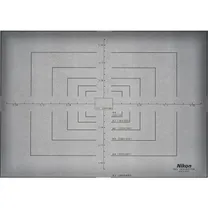
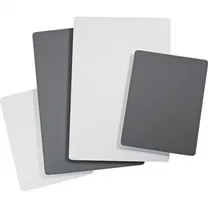
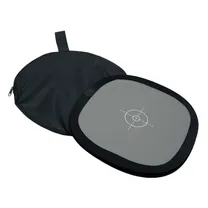
The use of a grey card is a valuable and affordable solution for perfect colour reproduction and white balance in your photos.

32 Search results Sort by:
Popularity
Popularity
Price low - high
Price high - low
Popularity
Price low - high
Price high - low
["12393222","12374843","122067526","12517530","12370601","12246452","12370599","12226915","12577995","12389893","118474","12195652","116459","12397746"]
Popularity
Price low - high
Price high - low

What is a grey card?

A grey card is made of cardboard or plastic and can be used to adjust the colour reproduction of a photo. This is necessary for limiting the influence of a light source on the colours and white balance and thus creates a correct colour image for the camera. The card is 18% light grey, bearing in mind that 0% is white and 100% is black. A good photo is calibrated to this value of 18%, so that a grey colour falls over the photo. By bringing the grey card into the visible light of the image, the camera can determine the correct settings.

Adjusting the white balance

When you take a photo with the grey card in the image of the camera, you can determine the correct white balance for the photo. It is important that the card is in the same lighting as the photo subject and that no shadows fall over the card. Focus completely on the grey card to set the white balance. The next step differs by camera, but in the settings you will often find an option to manually set the white balance. You must select the photo you've just taken with grey card as the reference photo. The next pictures will use the adjusted white balance.

Functional lighting

In addition to determining the white balance, the use of a grey card is also effective in determining the correct exposure. The principle works the same as when setting the white balance, but for exposure it is necessary that the value is set to 0. The exposure can be found in the camera settings. In manual mode, you can work towards 0 by changing the aperture or shutter speed. In automatic mode, the camera calculates the values itself.